Sketch Pencil Font for Web Design
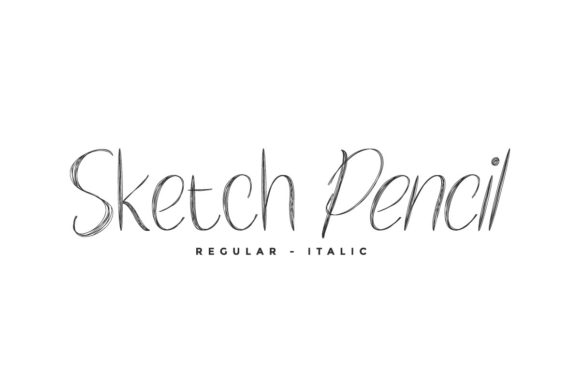
Working on a boutique online store’s homepage, I was looking for a font that could bring a warm, personal touch to the site’s hero section. Sketch Pencil caught my eye—it’s a cute and simple lettered handwritten font that feels authentic and realistic. It had the potential to make the brand feel more approachable and human.
The font’s visual characteristics are key. Its organic strokes and slight irregularities give it a handcrafted look that stands out from the polished digital typefaces often used in web design. This makes it perfect for chalkboard quotes, teaching materials, or any project that benefits from a more tactile, personal feel. But how would it perform in a real website layout?
Testing Sketch Pencil in Real Layouts
I started by placing Sketch Pencil over an image banner on the homepage. The font added a sense of whimsy and creativity without overpowering the background. It worked well as a headline, drawing attention while maintaining a friendly tone. For a coaching website, this could be ideal for headlines that invite visitors to explore more.
Next, I tested it on mobile screens. On smaller devices, the font’s subtle details can sometimes get lost, especially if the text is too small. But with proper sizing and spacing, Sketch Pencil still held up. It’s important to ensure that the font remains legible at different screen sizes and resolutions, especially when used for short phrases or call-to-action buttons.
Using Sketch Pencil in Website Headers and CTA Areas
For a product landing page, I experimented with using Sketch Pencil in the header and CTA buttons. The font’s personality made it stand out, but I found that it worked best when paired with a simpler, more readable font for body copy. A sans serif like Open Sans or Lato complemented the script style well, creating a balanced visual hierarchy.
In a portfolio site, Sketch Pencil could be used for logo text or decorative accents. It adds a unique flair that sets the site apart from others. However, I noticed that when used for longer paragraphs, the font’s irregularity could make reading less smooth. That’s why I recommend using it primarily for headings, titles, and short phrases rather than body text.
Readability and Visual Hierarchy
When designing for user engagement, readability is crucial. Sketch Pencil has a soft, flowing style that works well for headlines and subheadings but may not be the best choice for long blocks of text. For a blog redesign, I’d use it for headers and pull quotes rather than the main content.
On dark backgrounds, the font maintains good contrast, but on light backgrounds, it can sometimes appear too thin. Adjusting the weight or adding a subtle shadow helped improve visibility in those cases. When placed over images, the font needed careful placement to avoid clashing with the background elements.
Pairing Sketch Pencil with Other Fonts
Font pairing is an essential part of web design. Sketch Pencil pairs well with modern typography, especially when combined with a clean sans serif. This creates a contrast between the decorative and the functional, which can help guide users through the content more effectively.
For a digital brand kit, using Sketch Pencil in combination with a serif font could create a more editorial feel. This might work well for a course sales page or a promotional landing page where a mix of personality and professionalism is needed.
Practical Considerations for Web Use
Before implementing Sketch Pencil on a website, it’s important to check the available styles, webfont formats, and licensing. As part of the Script Amp collection, it likely comes in multiple weights and includes alternate characters for more flexibility. Ensuring multilingual support is also key if the site targets a global audience.
For a small business website, using Sketch Pencil in banners or social media graphics can add a cohesive, branded touch. It’s a great choice for creative businesses that want to emphasize their handmade or personalized offerings.
Overall, Sketch Pencil is a versatile and expressive font that can elevate a website’s design when used thoughtfully. Its handwritten charm brings a sense of authenticity that many digital projects lack. Whether you’re building a boutique online store, a coaching website, or a creative portfolio, Sketch Pencil offers a fresh and engaging way to communicate your brand’s voice.